
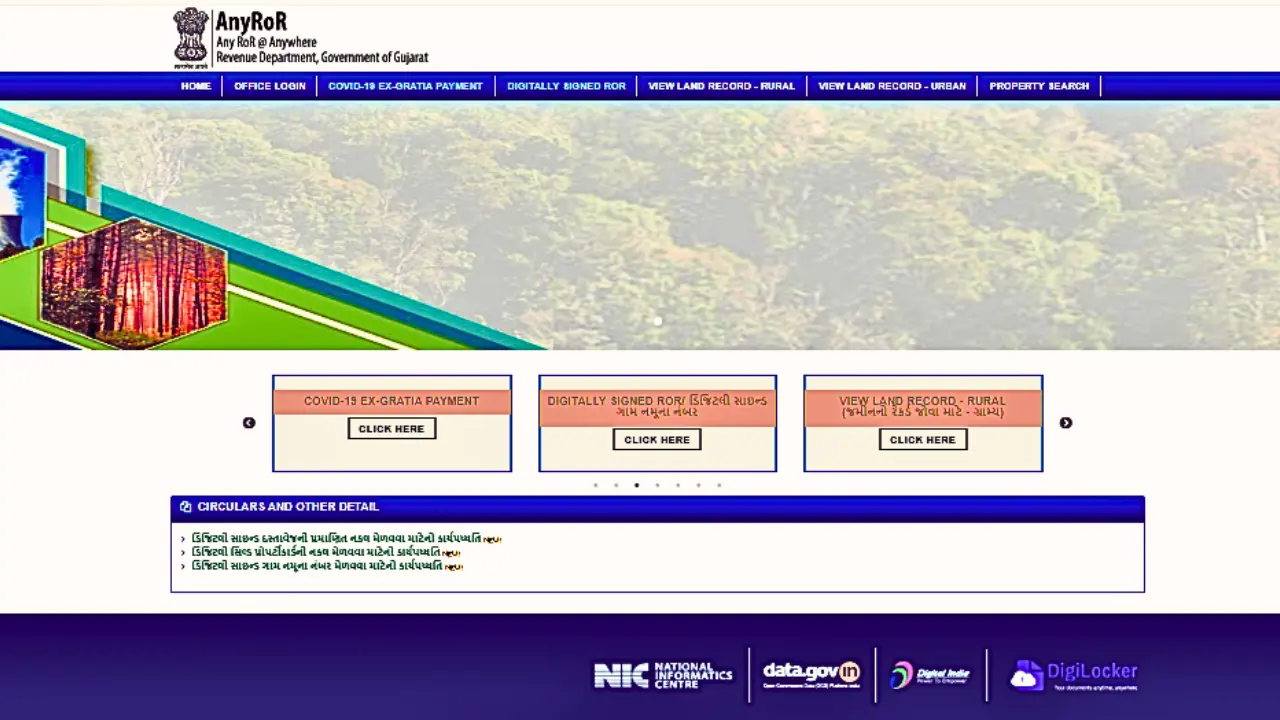
If you are a landowner, farmer, buyer, or seller in Gujarat, verifying property ownership is now faster and more convenient than ever before. In the past, obtaining essential documents such as the 7/12 Utara, Property Card, or VF records required multiple visits to government offices, long waiting hours, and reliance on intermediaries.
Today, digital platforms like the AnyRoR Gujarat land record portal have transformed the entire process by offering instant access to all major land documents online. With just a few clicks, users can view, verify, and download property information—ensuring accuracy, transparency, and a completely hassle-free experience.
What Is AnyRoR Gujarat?
Anyror stands for Any Records of Rights Anywhere. Launched by the Revenue Department of Gujarat, it is a centralized digital platform that lets citizens access both rural and urban land records.
Key Features:
- 24/7 access to government-verified land documents
- Multi-language support (Gujarati & English)
- Mobile-friendly interface
- Instant downloads of certified documents
Pro Tip: Always use the official website to avoid fake portals.
Types of Land Records Available
Rural Land Records
- 7/12 Utara (VF7) – Land ownership, cultivation details, and loans
- VF8A – Khata details and land rights
- VF6 – Mutation or ownership changes
- e-Chavdi – Village-level agricultural and land-use reports
Urban Land Records
- Property Card – Official ownership proof for urban properties
- Unit Property Card – Individual property details in larger complexes
- Property Tax Records – Municipal assessment and payment details
- Sub-Registrar Deeds – Verification of property registration
Step-by-Step Guide: How to Check Rural Land Records Online on AnyRoR Gujarat
Checking rural land records in Gujarat has become completely hassle-free with the AnyRoR portal. Follow the detailed instructions below to access documents like 7/12 Utara, VF7, VF8A, and other rural property records.
1. Visit the Official AnyRoR Gujarat Portal
Open your web browser and go to the official website:
anyror.gujarat.gov.in
Make sure you are using the verified government domain to avoid fake websites or phishing pages.
2. Select the Option “View Land Record – Rural”
On the homepage, you will see multiple services.
Click on “View Land Record – Rural” to access agricultural land records.
This section includes:
- 7/12 Utara (VF7)
- VF8A
- VF6 (Mutation Entries)
- Revenue Case Details
- Other rural land information
3. Enter Your Property and Location Details
You will be asked to fill in the following mandatory fields:
- District: Select your district from the dropdown list.
- Taluka: Choose your Taluka (sub-district).
- Village: Pick your village name.
- Survey Number / Block Number: Enter the correct survey or block number exactly as mentioned in your land documents.
Tip: Ensure that your survey number matches your official land papers to avoid incorrect results.
4. Complete Captcha Verification and Proceed
Enter the Captcha code displayed on the screen.
Click on “Get Record Detail” to submit your request.
The system will take a few seconds to retrieve your land record from the government database.
5. View, Download, or Print Your Rural Land Record
Your record will appear on the screen with complete details, including:
Ownership Details
- Landowner’s name
- Joint owner / family owner information (if applicable)
Land Classification
- Irrigated or non-irrigated
- Agricultural / barren / non-agricultural status
- Type of cultivation (if recorded)
Area & Measurement
- Total land area
- Measurement in hectares/sq. meters
- Sub-division details
Cultivation & Tenancy Rights
- Cultivator’s name
- Crop information (if available)
- Registered tenancy rights (if any)
You can choose to:
- View the record online
- Download a digital copy
- Print the document for personal or official use
Why This Process Matters
Using the AnyRoR portal ensures:
- Accurate, government-verified property information
- No middlemen or offline paperwork
- Instant access from mobile or desktop
- Transparency in rural land transactions
Urban Property Records: How to Access
- Go to the AnyRoR portal and select “View Land Record – Urban”.
- Choose Property Card or Unit Property Card.
- Enter details: District, Ward, City Survey Office, Survey Number.
- Complete Captcha and submit.
- Access the property record instantly.
Why Property Card Matters:
Confirms legal ownership
- Prevents fraud
- Needed for sale, purchase, or mortgage
Digitally Signed RoR: Legally Valid Documents
The Digitally Signed Record of Rights (RoR) allows you to download certified documents online. Steps:
- Select Digitally Signed RoR
- Enter your mobile number and generate OTP
- Select required land record
- Complete payment (nominal fee) and download
This digitally signed RoR is accepted by banks, registrars, and courts — no physical visit needed.
Common Mistakes First-Time Users Make
- Entering village names in English instead of Gujarati
- Using wrong survey numbers
- Checking during peak hours (slow loading)
- Downloading screenshots instead of official PDF
Tip: Always double-check survey numbers and khata details before submission.
Why AnyRoR Gujarat Is Ideal for NRIs
Many NRIs rely on relatives or agents for property verification. With AnyRoR:
- Verify ownership from anywhere in the world
- Check mutation entries or disputes
- Download official documents instantly
Final Thoughts
The AnyRoR Gujarat portal has truly revolutionized the way land records are accessed and verified across the state. Earlier, individuals often had to depend on government offices or third-party agents to obtain critical documents such as the 7/12 Utara, VF records, Property Cards, and digitally signed RoRs. This not only consumed time but also increased the chances of errors, delays, and even fraudulent activities.
With the introduction of this digital platform, landowners, buyers, farmers, advocates, and real-estate professionals can now access certified and verified land information instantly, without any physical paperwork. The portal ensures full transparency, reduces manual mistakes, and eliminates the need for middlemen—making property verification smoother and more secure than ever before.
Whether you are checking ownership details, verifying land boundaries, reviewing property history, or downloading official documents, the AnyRoR portal provides complete accuracy, real-time updates, and direct access from your smartphone or computer.
This guide helps you explore each feature step by step so you can confidently verify land records and make well-informed property decisions with ease.
